We've all had flashbacks to our childhood when our mothers told us, "Don't do that, or you'll regret it." But then we went ahead and did it anyway, right? As children, we just didn't have the wisdom or foresight to trust that advice. Now that we're older and wiser, we can take those words to heart.
Here are five "don't do that" tips for SharePoint that can save you hours of unnecessary re-work down the road. Not interested in following this advice? That's your decision, but don't say I didn't warn you.
NUMBER 1: Don't change the title on the core item content type.
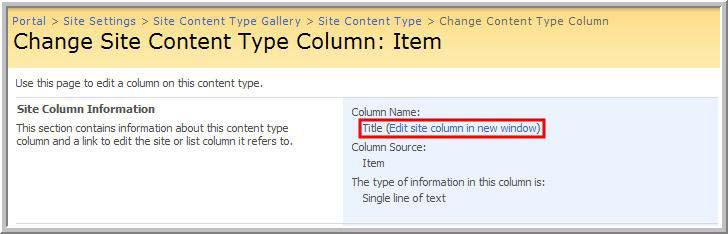
SharePoint has a Title column on every custom list (FIGURE 1), and it's used throughout the environment. If you rename the Title to something like "organization," you will have the undesired consequence of changing it in more places than you had planned.
FIGURE 1 (click to enlarge)

The problem will show itself very quickly—you'll probably receive phone calls from confused end users within the hour. It is difficult to fix and cannot be done out of the box. Share- Point recognizes the word Title, along with a number of other names, as being special. It will not let you create a column with that name, but itwill let you change the existing core column.
So you can rename the core Title column onMonday. But, when you realize your mistake on Tuesday, SharePoint won't let you fix the problem by setting the core column's name back to "Title" because "Title" is a reserved word. In other words, SharePoint allows you to enter a catch-22 situation and won't easily let you out.
The solution is to use a third-party tool, such as one you'd find on Code- Plex, or to write some C# orVB.NET code and make the correction programmatically. The easiest thing, though, is to save yourself the trouble by never changing the Title column's name.
NUMBER 2: Beware of "publishing site" templates.
If you create a site based on a publishing site template, you cannot save that site as a template (FIGURE 2).
FIGURE 2

More than one SharePoint pro has set out to create the perfect custom template. They do everything the right way: They interview the users and work with them over a period of a week or two to design the ideal custom template. But when they create the site to use as a template, they hit a snag.
Here's the problem: Everything looks perfect, but then you go to save your site as a template so you can reuse it, and can't do it.
FIGURE 3A shows the look-and-feel options for a site based on a publishing template, and FIGURE 3B shows a site based on a collaboration template.
FIGURE 3A

FIGURE 3B (click to enlarge)

If you've done this to yourself, your best bet is to start over with a collaboration template. Consider using a blank template or possibly a team site template as your starting point. If you want or need publishing features in your custom template, enable them on your site, as shown in FIGURE 4.
FIGURE 4 (click to enlarge)

NUMBER 3: Don't define content types in the wrong place.
Content types fit within the site hierarchy of your sites. Consider the following hierarchy:
Portal
SubSite A
SubSite AA
SubSite AAA
SubSite B
SubSite BB
SubSite C
SubSite CC
SubSite CCC
If you define a site content type at "SubSite C," it will be available to Sub- Site CC and SubSite CCC. But it will not be available to SubSite A, SubSite B or their children. There is no easy way to move a Site Content Type around in the hierarchy. If you make this mistake, your only alternative is to delete the Content Type and recreate it at the right position in the hierarchy.
Deleting a content type can be drastic and—very possibly—impossible as a practical matter. Once content such as documents orWeb pages use a Content Type, you cannot delete it. The most important lesson to draw here is that a well-thoughtout information architecture is vital for a healthy SharePoint environment.
NUMBER 4: Don't expect to rescue SharePoint Designer workflows.
SharePoint Designer is a friendly wizard that allows properly trained business analysts to create workflows. Companies leverage these workflows to solve a wide variety of business problems. But, a SharePoint Designer workflow has a major technical limitation that escapes the notice of many first-time SharePoint users: It is always tied to a specific list.
Many times, organizations define multi-step workflows that solve business problems common to multiple teams and divisions within a company. Wouldn't it be great if you could design and implement a workflow in one list and then just drag and drop the workflow to another list in the environment? It might be, but you're out of luck.
There are some highly technical methods to get around the reuse problem. But, the time required to create a technical solution is just not worth it.
NUMBER 5: Workflow history is not an audit trail.
This is an insidious issue because you would never notice the problem until it's far too late. For example, an auditor is tapping you on the shoulder, asking you to demonstrate when a particular financial document was approved and by whom. You go to the workflow history and it's empty. Why? By default, SharePoint purges workflow history after 60 days.
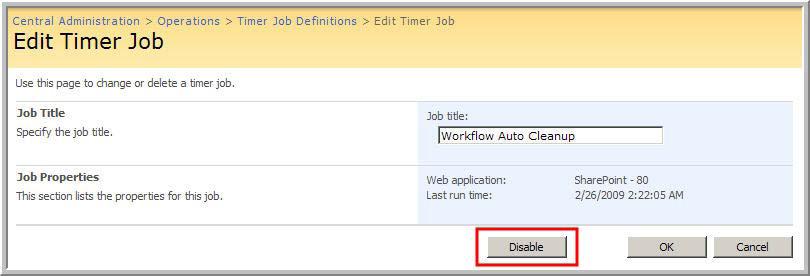
There are several ways to address this problem: You can disable the job that does the purging (FIGURE 5). You can change the purge interval using the stsadm command line program. Or you can write your own audit mechanism. SharePoint Designer can write critical auditable events to a custom list.
FIGURE 5 (click to enlarge)

The best choice is to leverage builtin auditing, possibly with a third-party tool that specializes in audit reporting in a SharePoint environment.
So there you have it. Now you know what not to do.
Some of these SharePoint pitfalls are relatively easy to overcome, such as picking a publishing template as a base for your own custom templates. Others are not.
And for those, you may have to start over. Use these tips to avoid these traps, and you'll have a more stable and productive experience with SharePoint.
Paul Galvin is a Microsoft SharePoint MVP and a SharePoint solutions architect at EMC Corp. Galvin has worked in the IT industry for more than 15 years in such areas as software development, consulting and SharePoint solutions design, where he works with clients to create business solutions using the SharePoint platform. He contributes to the SharePoint community through MSDN forums and his blog at http://paulgalvin.spaces.live.com.