Tuesday, October 14, 2008

7 Version Control Systems Reviewed

If you've ever collaborated with other people on a project, you know the frustration of constantly swapping files. Some do it by email, some through file upload services and some by other methods. It's a pain in the neck, and every designer and developer knows it. Revision control is an excellent way to combat the problem of sharing files between workers.

Most web-developers have probably worked with some sort of revision control system, but designers may find it a foreign concept. The most obvious benefit of using revision control is the ability to have an unlimited number of people working on the same code base, without having to constantly send files back and forth.

But designers and developers can both benefit from using revision control systems to keep copies of their files and designs. You can instantly browse previous "commits" to your repository and revert to earlier versions if something happens.

This article reviews some of the top open-source version control systems and tools that make setting up a version control system easy.

CVS

CVS is the grandfather of revision control systems. It was first released in 1986, and Google Code still hosts the original Usenet post announcing CVS. CVS is the de facto standard and is installed virtually everywhere. However, the code base isn't as fully featured as SVN or other solutions....

Read the rest of this article on :SmashingMagazine.com

Saturday, September 20, 2008

Persian Calendar for SharePoint 2007

Within last a few months me and two of my friends have started working on implementing Persian Calendar for SharePoint 2007. Now after more than 6, 7 month work on this we have the Persian Calendar implemented in SharePoint 2007.

One of the most important point about this package is that youwil stil have your Hijri calendar while you can use Persian Calendar too. Also it 's possible to develop web parts which can use Sharepoint Persian Calendar.
While Microsoft is not supporting Persian calendar on Sharepoint officialy, Now we are negotiating to transfer this technology, with some of the most active companies which are working on providing SharePoint stuff in Iran and Middle East.
You can find out more news about Sharepoint 2007 Persian Calendar on my web site : http://www.tabatabaei.info/

Sunday, August 24, 2008

Disabling Auto-Complete on ASP.NET Forms

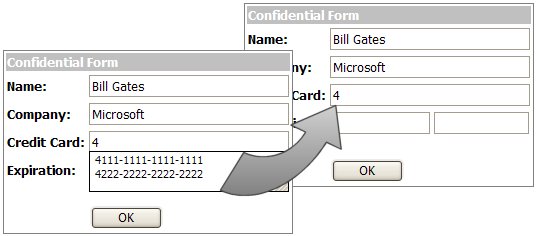
Popular browsers, such as Internet Explorer and Firefox support something called Auto-Complete. You've seen this many times. You go to a online form and as you start to type in fields you get a drop-down showing values you've typed in that field before. This feature can be turned off, but it really is a useful feature and can save you a lot of typing when entering redundant values.

As a web developer, you have to be conscious of the fact that the user's browser will likely have auto-complete turned on and be responsible enough to act accordingly. If you have a form that where the user could possibly enter private or secure values you need to be mindful that if the user is on a public computer that these values will be cached by the browser and seen by other users of that computer. You are able to control if the browser uses AutoComplete for your form or for specific values with just a small & simple tweak.
To turn off auto-complete for your entire form, all you need to do is add an attribute to your form tag, like this:
<form id="Form1" method="post" runat="server"
autocomplete="off">
Easy enough. Now you won't get the auto complete on any of the controls on the form, works for any browser that supports auto-complete. The HTML INPUT tags also support the use of autocomplete=off and since the control renders as INPUT tags then you can use it to set it on a control by control basis. Just add it to the TextBox at design-time (but note that VS.NET will underline it with a squiggly saying that textbox does not have an attribute for autocomplete - but it will still work):
<asp:TextBox Runat="server" ID="Textbox1"
autocomplete="off"><!--asp:TextBox>
or at runtime:
Textbox1.Attributes.Add("autocomplete", "off");

From Ryan Farley 's weblog. See the original post on his blog : http://ryanfarley.com/blog/archive/2005/02/23/1739.aspx.

Monday, June 30, 2008

IE Developer Toolbar & Fire Bug

There is lot of tools & utilities that you may use to develop your web application or web site with ASP .NET.
In many cases you may want to debug & watch what is happening on your browser.
If you want to debug your web site behavior in your browsers and check style sheet effect and javascripts and .... I suggest you to use this two utilities:

  1. IE Developer Toolbar
  2. FireBug
Both of them are used to check browser behavior against your html, javascript and style sheets within your web applications, one of them for Internet Explorer and the other one for Mozilla FireFox. I really love FireBug but usually you have to check something for IE users,too.

Click on links below to download these free tools:

Download IE Developer Toolbar
Download FireBug

Friday, June 13, 2008

C# Tuning Training Videos - Async Method Calling - Part One

Finally, I've started to publish some training videos about C# and ASP .NET.
In first video I will explain how to call a method with asynchronous delegates.


C# Tuning Training Videos - Asynchronous Method Calling - Part 1

Monday, May 5, 2008

How to become a great developer?

Fredrik Normén is one of Most Valuable Professionals. He has a post on his blog explaining how to become a great developer. I liked that and I think it can useful for you, if you are planning to be a great developer.

Here is the link to original post on his blog:
Do you want to become a great developer?

Thursday, April 24, 2008

Simple Windows Explorer by C#

This is simple software like Windows Explorer. Of course it’s very simple but in this sample I have covered usage of some of the classes in System.IO namespace such as Path, FileInfo, DriveInfo, FileSystemWatcher, DirectoryInfo.

TreeView is loading it’s nodes On Demand which is an applicable way used in real applications। If you double click on a text file it will be opened in a new window which. I have used StreamReader and StreamWriter classes to implement reading/writing text files. Other file type will be opened by a BinaryReader for you to show the Binary data inside them.

Please let me know if there any error or question within this sample.
Download

Saturday, January 19, 2008

C# Tuning in Farsi

Since almost two month ago, I have started to write some continues articles about Object Oriented Programming and C Sharp in my Farsi web log. I hope this can help Iran, Tajik, Afghanistan and other Farsi speaking people in all around the world to learn C# a bit deeper that in it's useful way.

Please help me on this way by your comments. I will also continue here in C# Tuning.


Wednesday, January 16, 2008

"Single Sign-On" my first article on aspalliance.com

I have written an article about Single Sign-On which today is published on http://aspalliance.com web site.
If you are interested in you find in here:

http://aspalliance.com/1545_Understanding_Single_SignOn_in_ASPNET_20

Let me know your feedback.

Monday, December 3, 2007

Visual Studio .NET Keyboard shortcuts

While I 'm working and training C# or ASP .NET some of student asking me about what are the common shortcuts that I 'm using in Visual Studio.
Here is a list of Visual Studio 2005 and also Visual Studio 2008 keyboard shortcuts.

Visual Studio .NET 2005 C# Keybinding
Visual Studio .NET 2008 C# Keybinding


Enjoy it.